Friday, June 5, 2009
tweetdeck
I had a little trouble getting tweetdeck installed. When I clicked on the app, an Adobe msg came up saying I needed to install the free Adobe AIR program. But it wouldn't let me click on it. So I went straight to the adobe website by searching adobe air. That took me two passes because the first link they showed me was for the AIR SDK, which is interesting, but I'm not just yet wanting to develop my own AIR app. But I got that installed now so I can start tweeting on the mac.

Thursday, June 4, 2009
rename home directory worked
The technique I mentioned in the last post worked, the one from the apple knowledge base where they walk you through creating a new account and moving all your settings, files, etc. from your old home. So one thumb down and one thumb up on this one. The second thumb was up.
Here's the link again:
first blush
This is my first post as a Mac. Yes, I'm writing from my MacBook Pro 17'' beauty.

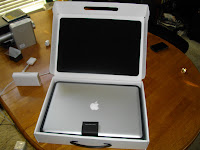


And my topic is about the first blush. I intend to journal my doings as I wade into macworld over the next days (weeks? months?).
the box
First off, I LOVE the box it came in. I've ordered many computers in my day, and many other electronics as well. The thing that hit me about this was that the box was made for the computer. Sure it was in an outer cardboard box like anything would be. But once inside, most computer vendors would do some engineering work to create packing material that precisely fit the computer, giving it a snug and comfortable ride. Not apple. What they did was custom design an entire box for the MBP's temporary home.


orientation
The next thing that happened was me feeling like an idiot. After I took the MBP out I felt like an idiot because I couldn't get the lid open. Then my son, who was manning the video camera suggested that I turn it around. Sure enough I had it backwards. It's because I was mesmerized by the apple I think, which was right-side up facing me. But it is supposed to be right-side up when it's open, facing the world. Free advertising.
((insert picture))
opening scene
The opening video was impressive I must say. Microsoft has over the years tried to make their opening video friendlier and more colorful. But it just can't compare to the opening scene of Star Trek, which is what the opening of my mac remind me of. Nice. And for the record, the Microsoft one still sucks.
keys
Then of course it was the keys. The last generation of macbookpro, which I saw all over New York City yesterday, had silver keys. They're beautiful, especially when they're backlit on a airplane. But they can't compare to the black backlit keys of this model. As I sit in my office right now, well lit enough with leaking sunlight through the shades, it is dark enough for the mac to light the keys. Or maybe it's always on. Dunno.

presentation
The next thing that happened was my wife's parents came to pick up my grandmother to take her back home. But before they left, they wanted to see the pictures of our trip to New York (my daughter and I just got back this afternoon--it was a special trip for her 15th birthday). So I ran my Canon A620 straight to the video port on the HDTV and did the slideshow thing. And then Jill asked me if there was a way to show them a youtube video on the HDTV. I told her that we would need a computer. Then she had a new idea--how about I hook my new apple up and use that? I think she planned it all along.
That proved simple enough. However, the thing went letterbox on me, and it went dual-home also (translated for non-displaylaureates: my desktop was split up onto two monitors--the laptop screen was the first one and the HDTV was the second one; I could drag windows back and forth to either; but the HDTV screen's picture didn't go all the way to the edge--the picture was in a "letterbox" in the middle of the screen with black bars on the sides). This was disconcerting to me, and it became irritating as I scoured the keyboard for the display toggle button.
On a Thinkpad it's fn+F7. On a Dell it's fn+F8. And on those models there is a little blue picture in the top corner of the function key letting you know that pressing it cycles the display mode from laptop to external monitor to both and then back to laptop. Not so on the mac. Instead I discovered that you get a little picture of the display up in the bar at the top of the screen (whatever that's called). When you click on that picture you get a dropdown menu. From there you can choose the screen resolution of all your active displays (laptop, HDTV, etc.) and choose a few other options. But one thing was disconcerting. I haven't yet figured out how to get a true mirror mode. My mac is 1920 x 1200. My HDTV is 1920 x 1080. When I went mirror mode it got all funkified on the laptop display. I'll probably figure this out, but I'm still not happy here. On my Thinkpads I have a COOL utility that ships with it called Presentation Manager. When you press fn+F7 like I mentioned before, instead of cycling though the display modes, you get an onscreen popup menu that you can choose which way you want to go. And you can save your settings so that with one click you can choose between mirror mode on an HDTV or an extended desktop on an external monitor that is an odd resolution, or several other settings. It also has a discovery mode to help you get the perfect settings on a brand new monitor the first time--such as when you show up to do a presentation at a client on their projector or supersize conference room monitor. Anyway, I'm sure I'll figure this out on a mac, but until then I still like the Lenovo Presentation Manager best of all.
But all things considered, it was very easy to hook up the MBP to the HDTV. I just plugged in the mini-to-VGA cable I bought with the mac, plugged that in to the VGA cable that remains connected to the back of the HDTV, and the MBP automatically found it and started sending video to it. No fanfare. It just worked.
appleusername451
Ok. This is a BIG warning to all new apple users. When you log in the first time to your new mac, you get a super fancy video that makes you feel like someone's in charge who knows what they're doing. It's the one I talked about before that looks like Star Trek. Careful. It asks you what language you want and where you are located, and how you're going to use the computer (to satisfy apple's snoopy side). And then it asks if you have an apple store id. Well, if you ordered your mac online you definitely have one because that's the only way you can order online. If you have an iTunes account, then you have one, too. This id spans the apple domain. Since I did had an apple store id, I proudly entered it and put my password in for it. That allowed apple to retrieve my personal information and fill in the rest of the blanks for me. All good so far.
Until.
I finished the login and setup process and opened Finder. I noticed something strange. On the prominent "places" location, basically the home page for the local computer, instead of having my name or an abbreviated version of my name, I get my apple store id. But I DO NOT WANT MY APPLE STORE ID AS THE NAME OF MY HOME FOLDER. My apple store ID was something I had to use for the apple store, which contained the ubiquitous number-in-the-login because someone had already used the id I wanted. I looked and looked for how to change this only to find that this is a huge issue. Everything is coded to that short name. Even though my "account" on this computer is called "Steve Coan" the short name, which is unchangeable AT ALL is my apple store id. This is terrible, apple.
I finally found this apple knowledge base article that shows you "How to change user short name or home directory name", which is actually a misnomer, because the truth is that you can't change this "short name" at all without jeopardizing the stability of your system. So what you do is:
- enable root login,
- login as root,
- navigate to the /users folder,
- rename the folder to the new short name you want,
- create a new user matching the new short name, and
- when the system objects because the folder already exists, tell it to recycle it
Well, that's about enough for the first blush. I am struggling through my acquaintance with the apple keyboard as I edit this post (control, option, command what?). Some of the key combinations I already know, like cut, copy, and paste. But some of this stuff drives me nuts like the fact that there is NO DELETE KEY. And that the backspace key is actually labeled "delete". Oy! Heh, I just realized that if you're a long time mac you may have no idea what I am talking about. :) But on the flip side I love the trackpad, which I am surprisingly comfortable with after a few trips to the apple store to experiment. More later.
Monday, June 1, 2009
the virtues of a doorbell
After all that waiting and tracking, I missed it. Fedex came this morning at 8:32 AM with my mac. Nobody heard them. They left a hanger on the door saying they would come back tomorrow. Oy! I need a doorbell. I think I'll get one that sounds like a foghorn.
But what a sprint! I put a custom order in on Wednesday night. Those Chinese went straight to work putting it together and then sent it to my doorstep on the opposite side of the globe via Fedex by Monday morning. Wow.
http://www.fedex.com/Tracking?action=track&language=english&cntry_code=us&initial=x&tracknumbers=401512624009
But what a sprint! I put a custom order in on Wednesday night. Those Chinese went straight to work putting it together and then sent it to my doorstep on the opposite side of the globe via Fedex by Monday morning. Wow.
http://www.fedex.com/Tracking?action=track&language=english&cntry_code=us&initial=x&tracknumbers=401512624009
still tracking
I'm so glad that they figured out how to post package tracking data on the web. Apple sent me an email linking to my fedex package tracking page.
I remember when we all first started talking about adding embedded objects on pages with web services, and we used UPS as a great example. The problem is that UPS and Fedex see embedding their information inside somebody else's page as taking traffic away from their page. So they won't open it up. Yeah, cause that's their business--driving web traffic to their site. Whatever.
But at least you can track it by linking to their site today with your tracking number. In the early days, they wouldn't even do that. You had to go to their page where they would give you an empty box, then you had copy and paste your forever long tracking number in there, and hit "submit".
How hard, really, would it be for them to make a web service that provided that same info as an html-rendered snippet that you could choose between several formats (all including the UPS or fedex logo as a graphic) and include in your own website? Not hard.
Well anyway, it's fun to see that the macbook pro that will adorn my desktop and coffee shops around the world was born in Shanghai, made it here by way of Anchorage, and hung out with some other macs in Memphis before heading my way.
Meanwhile, I'm heading to New York tomorrow with my daughter for a holiday. It's her birthday. Gonna catch Phantom of the Opera on Broadway, see the sights, and eat a hotdog off the street. Can't wait.
I remember when we all first started talking about adding embedded objects on pages with web services, and we used UPS as a great example. The problem is that UPS and Fedex see embedding their information inside somebody else's page as taking traffic away from their page. So they won't open it up. Yeah, cause that's their business--driving web traffic to their site. Whatever.
But at least you can track it by linking to their site today with your tracking number. In the early days, they wouldn't even do that. You had to go to their page where they would give you an empty box, then you had copy and paste your forever long tracking number in there, and hit "submit".
How hard, really, would it be for them to make a web service that provided that same info as an html-rendered snippet that you could choose between several formats (all including the UPS or fedex logo as a graphic) and include in your own website? Not hard.
Well anyway, it's fun to see that the macbook pro that will adorn my desktop and coffee shops around the world was born in Shanghai, made it here by way of Anchorage, and hung out with some other macs in Memphis before heading my way.
Meanwhile, I'm heading to New York tomorrow with my daughter for a holiday. It's her birthday. Gonna catch Phantom of the Opera on Broadway, see the sights, and eat a hotdog off the street. Can't wait.
Saturday, May 30, 2009
i'm on my way
And I just got word that my MacBook Pro 17 is in transit from Shanghai. China. You think it will fly here or float?
Going through my head right now is a song in German-English "I'm on my way-ay. I'm on my way-ay, home sweet home"
Going through my head right now is a song in German-English "I'm on my way-ay. I'm on my way-ay, home sweet home"
Friday, May 29, 2009
meantime glossin
I'm still a little worried about the glare on that HUGE glossy screen. So I've been poking around the net looking for an anti-glare screen cover. On the apple online store they only have films for the 13 through 15 inch models. Two trips ago to the apple southlake store an apple shirt told me they had one for the 17, which made me decide to get the glossy LED. But on the next trip another shirt told me he wasn't sure they had a 17, and when he went back and looked and asked it turned out they don't sell one. So I decided to get the anti-glare. Until I changed my mind again. Am I a little OC? Maybe.
 Anyway, I started thinking again that I need to get not only anti-glare but anti-snoop. So I looked online for a privacy filter. I found one that looked to be custom de for MacBook Pro's. It was called Elago Privacy Protection Film for Apple MacBook Pro 15.4" Screens. The page was filled with other apple stuff, stuff I might also allegedly want to buy. But after clicking several "explore similar items" links, I still couldn't find a 17" model. So I clicked that link to send the seller a question.
Here's what I asked the seller:
When I clicked the first one I was elated. The picture was identical to the one I had already seen (above), and I was ready to buy it, but decided to wait. But then something hit me. Why did they send two links? Apple doesn't and has never made a 17 inch MacBook Pro without a wide screen. So why two links? When I clicked the second link, it also had the exact same picture but the description said it was for an HP Pavillion dv9700t. Yeah, I remember that 10 lb. beast. I had it on my comparison spreadsheet. No thanks.
So I'm still in a holding pattern on the privacy filter. I imagine someone will come out with one for the MBP17 soon. Until then I'm not buying anti-glare from someone who glosses over details.
Anyway, I started thinking again that I need to get not only anti-glare but anti-snoop. So I looked online for a privacy filter. I found one that looked to be custom de for MacBook Pro's. It was called Elago Privacy Protection Film for Apple MacBook Pro 15.4" Screens. The page was filled with other apple stuff, stuff I might also allegedly want to buy. But after clicking several "explore similar items" links, I still couldn't find a 17" model. So I clicked that link to send the seller a question.Here's what I asked the seller:
I saw your privacy screen for the MacBook Pro 15.4". Do you have a similar product for the 17"?Here was their reply:
Here are the links to the products they suggested: B001AQY6L2 and B0013A2A5E (wide).
Dear Customer,
Thank you for your e-mail.
We do carry 17" privacy filters in regular and wide screen.
If you want regular search Amazon.com with B001AQY6L2.
For Wide, please use B0013A2A5E
Thank you,
Jowow Support
When I clicked the first one I was elated. The picture was identical to the one I had already seen (above), and I was ready to buy it, but decided to wait. But then something hit me. Why did they send two links? Apple doesn't and has never made a 17 inch MacBook Pro without a wide screen. So why two links? When I clicked the second link, it also had the exact same picture but the description said it was for an HP Pavillion dv9700t. Yeah, I remember that 10 lb. beast. I had it on my comparison spreadsheet. No thanks.
So I'm still in a holding pattern on the privacy filter. I imagine someone will come out with one for the MBP17 soon. Until then I'm not buying anti-glare from someone who glosses over details.
waiting for his mac to come in
I'm just waiting and waiting and waiting for my mac to come in. I got two emails yesterday saying "Shipment Notification". But they were both false alarms. The first one was for the free ipod touch, the airline adapter, the warranty, and the expedited shipping charge. The second was for microsoft office mac media edition 2 usa. It was good of them to send me a Fedex tracking number and a link to that page. So all that stuff is somewhere between Memphis and Colleyville. But where's the mac?
Wednesday, May 27, 2009
my first mac?
I posted earlier that I just bought my first Mac.
Well, it's not my first Mac in the house - Jill has one and so does Christopher. And it's not my first Mac to use for sure. My first mac to use was an apple 2 back in high school. After that I used a mac in college to write papers (timeshare). And I also had some timeshare on UNIX in college, too--does that make me educated in OSX? And I repaired Macs when I worked at ComputerLand. And while at said job (when I got all caught up with my work of course) I played a very cool game that I very much hope to find again. But still, this is my first Mac.
Well, it's not my first Mac in the house - Jill has one and so does Christopher. And it's not my first Mac to use for sure. My first mac to use was an apple 2 back in high school. After that I used a mac in college to write papers (timeshare). And I also had some timeshare on UNIX in college, too--does that make me educated in OSX? And I repaired Macs when I worked at ComputerLand. And while at said job (when I got all caught up with my work of course) I played a very cool game that I very much hope to find again. But still, this is my first Mac.
kinky
Well, I have to report the good and the bad.
There was a fly in my order's ointment.
I either forgot to add Microsoft Office 2008 - Special Media Edition to my order or else somehow the cart dropped it. I wouldn't hold it against the cart to drop it in all the confusion. There's only so much a shopping cart can take after all. I probably priced that system out, including software and accessories, about...hmm...30 times?
I wasn't sure it had actually been omitted. After all, it is a Microsoft product, not an Apple product, so I thought maybe it would come on a separate invoice. So I decided to call order support. Not exactly glad I did that, but hey, it was an experience.
I spent an hour on the phone with Regina, who (after considerable effort):
a. Found Office 2008 – Special Media Edition
b. Found that it was indeed 50% off ($250 savings)
c. Added it to my existing order
I confirmed that the correct amounts were on my credit card as pending transactions and also that my order had been updated on my apple store order status page. So I feel reasonably confident in it.
But an HOUR to do this? It wasn't like it was hard. I can walk anyone through the process of adding the system, adding Office, and seeing the total price after discount in about...hmmm...30 seconds?
Anyway, I think it's resolved after she checked and double-checked and verified and double-checked with her supervisor and checked again and verified again and made the change and verified it before committing it after finally seeing what I had seen and relayed to her.
So a minor butt ache from the kink in the system, but now I'm watching the mailbox like a hawk for it.
There was a fly in my order's ointment.
I either forgot to add Microsoft Office 2008 - Special Media Edition to my order or else somehow the cart dropped it. I wouldn't hold it against the cart to drop it in all the confusion. There's only so much a shopping cart can take after all. I probably priced that system out, including software and accessories, about...hmm...30 times?
I wasn't sure it had actually been omitted. After all, it is a Microsoft product, not an Apple product, so I thought maybe it would come on a separate invoice. So I decided to call order support. Not exactly glad I did that, but hey, it was an experience.
I spent an hour on the phone with Regina, who (after considerable effort):
a. Found Office 2008 – Special Media Edition
b. Found that it was indeed 50% off ($250 savings)
c. Added it to my existing order
I confirmed that the correct amounts were on my credit card as pending transactions and also that my order had been updated on my apple store order status page. So I feel reasonably confident in it.
But an HOUR to do this? It wasn't like it was hard. I can walk anyone through the process of adding the system, adding Office, and seeing the total price after discount in about...hmmm...30 seconds?
Anyway, I think it's resolved after she checked and double-checked and verified and double-checked with her supervisor and checked again and verified again and made the change and verified it before committing it after finally seeing what I had seen and relayed to her.
So a minor butt ache from the kink in the system, but now I'm watching the mailbox like a hawk for it.
i did it
I took the plunge. I just ordered my first mac, a MacBook Pro 17. Can't wait to get it in. I decided on the glossy display after all because what the heck? If I'm gonna be a mac, I may as well go all the way.
apple. store. genius.
I just can't get over the apple store. Granted there are different levels of expertise among the staff. But man do they know their stuff.
It used to be that retail had an educational component. You went to the store and got educated on a product by a sales associate so you could make an informed purchase. You were edified by the info, and the sales associate rightly earned a modest commission on the sale. Not so today. Jill was in Walmart the other day and asked them if they had a certain product. The sales associate said no. She walked over to the other side of the store and found it. But don't stop at Walmart. I love to go to Best Buy and start asking questions about the stuff--the stuff THEY SELL--and watch the blue-shirt reach for the tag hanging off the product to read me the marketing info. Yeah. I know where to get all the marketing info I want.
The apple store may be the last vestige of good retail in America. Most of the people in there can answer most of the questions I throw at them. And when they can't, instead of making up something, they redirect me over to one of their "geniuses".
Genius.
P.S. My Apple Store is Southlake Town Square
It used to be that retail had an educational component. You went to the store and got educated on a product by a sales associate so you could make an informed purchase. You were edified by the info, and the sales associate rightly earned a modest commission on the sale. Not so today. Jill was in Walmart the other day and asked them if they had a certain product. The sales associate said no. She walked over to the other side of the store and found it. But don't stop at Walmart. I love to go to Best Buy and start asking questions about the stuff--the stuff THEY SELL--and watch the blue-shirt reach for the tag hanging off the product to read me the marketing info. Yeah. I know where to get all the marketing info I want.
The apple store may be the last vestige of good retail in America. Most of the people in there can answer most of the questions I throw at them. And when they can't, instead of making up something, they redirect me over to one of their "geniuses".
Genius.
P.S. My Apple Store is Southlake Town Square
Tuesday, May 26, 2009
tutorials
I'm going through the mac tutorials, slowly but surely. some of them are quite basic, but there's good info there.
Monday, May 25, 2009
sharp edges and glaring realities
I dropped by the Apple store again tonight to look at the MacBook Pro 17" models. Again. The pea under my mattress this time was what the guy said last time--that some people like to buy the Protection Pack because they don't like how sharp the edge is on the front of the keyboard. The protection pack protects the laptop with a clear film that overlays it. And if you apply it over the front lip of the laptop it also protects your wrists.
I realize I don't maintain the best posture when sitting at my home office, but it is what it is. I frequently lean back in my executive chair, resting my wrists on the front of the laptop, which is elevated slightly because of the table/chair arrangement. This puts a lot of pressure on my wrists. With the Thinkpad I currently use it's not a huge problem because of the beveled edge they put on it (ThinkPad really does have a nice design--too bad it's a PC). I haven't been diagnosed with Carpal Tunnel, and I don't have those symptoms, but I have had some pain in my right wrist (I actually wonder if I broke it a few months ago).
Anyway, I went by to have another look and to try to simulate my relative position to the thing by squatting in front of the table. I think it's not going to be a problem.
But in the process, I started second guessing myself on the glossy vs. anti-glare option. The glossy is SO beautiful. But I have a hang-up about glare and really think I won't be happy with a screen that big that's glossy. In my office I get afternoon sun. If I am wearing white I can see the reflection in the screen, and it's very distracting. And this is with an anti-glare screen. A glossy screen has gotta be worse for that. Macs seem to get on with it and look beyond the glare, but this old PC is having a hard time accepting that reality.
I do know what it's like to have a glossy finish. I picked the Samsung HDTV over the Sony or some others, even though it's glossy. I worried about the glare on that, too, but it so far has been a great picture, and the glare hasn't been an issue. But I can't get out of my head the lady in front of the mac next to me whose reflection was crystal clear as I looked across the two, comparing.
The other related topic to this is a privacy filter for keeping the snoop factor down on airplanes. I have one for my 15.4" laptops and love it. It not only reduces the viewing angle, but also the glare. I asked Jill what she thought about it, and she said I should get the glossy and one of those privacy filters--that way if the glare is really bugging me I can just throw that on. Maybe that will work. But I haven't found one online that works for the MBP17 yet.
Meanwhile, I'm busy writing my story of how I became a PC and how I am becoming a Mac. It's taking longer to get that done than I thought, so....Coming Soon.
I realize I don't maintain the best posture when sitting at my home office, but it is what it is. I frequently lean back in my executive chair, resting my wrists on the front of the laptop, which is elevated slightly because of the table/chair arrangement. This puts a lot of pressure on my wrists. With the Thinkpad I currently use it's not a huge problem because of the beveled edge they put on it (ThinkPad really does have a nice design--too bad it's a PC). I haven't been diagnosed with Carpal Tunnel, and I don't have those symptoms, but I have had some pain in my right wrist (I actually wonder if I broke it a few months ago).
Anyway, I went by to have another look and to try to simulate my relative position to the thing by squatting in front of the table. I think it's not going to be a problem.
But in the process, I started second guessing myself on the glossy vs. anti-glare option. The glossy is SO beautiful. But I have a hang-up about glare and really think I won't be happy with a screen that big that's glossy. In my office I get afternoon sun. If I am wearing white I can see the reflection in the screen, and it's very distracting. And this is with an anti-glare screen. A glossy screen has gotta be worse for that. Macs seem to get on with it and look beyond the glare, but this old PC is having a hard time accepting that reality.
I do know what it's like to have a glossy finish. I picked the Samsung HDTV over the Sony or some others, even though it's glossy. I worried about the glare on that, too, but it so far has been a great picture, and the glare hasn't been an issue. But I can't get out of my head the lady in front of the mac next to me whose reflection was crystal clear as I looked across the two, comparing.
The other related topic to this is a privacy filter for keeping the snoop factor down on airplanes. I have one for my 15.4" laptops and love it. It not only reduces the viewing angle, but also the glare. I asked Jill what she thought about it, and she said I should get the glossy and one of those privacy filters--that way if the glare is really bugging me I can just throw that on. Maybe that will work. But I haven't found one online that works for the MBP17 yet.
Meanwhile, I'm busy writing my story of how I became a PC and how I am becoming a Mac. It's taking longer to get that done than I thought, so....Coming Soon.
Subscribe to:
Posts (Atom)
