So much for "Love means never having to say you're rebooting."
I had to reboot. While cycling down I got this status message on screen from "File Vault" saying, "Recovering disk space in Steve Coan's Home folder". It never finished. I gave it 10 minutes before doing the press-and-hold-the-power-button move. After that it restarted and booted very fast.
After rebooting were my problems resolved? Yes and no.
The screen grab move works great (command+shift+4+space).
The trackpad gestures still weren't working. But I tried a few things that I thought would work. I went into the trackpad system preferences and modified the settings. Several things didn't work, but after changing the tracking speed of the trackpad, something got unstuck and the gestures started working again.
I took screen shots of the process inspector for SystemUIServer. That was laborious without the grabber key combo. I may post them later.
So I'm apparently back up and running again. That was the second time I've had to reboot.
Wednesday, June 10, 2009

time to reboot
I just logged out and in again. This time I made sure nothing was in the way. I unplugged all external drives and my external mouse. I ejected the DVD. No programs were running except for Firefox from my last post.
It took 05:16.3 to logout.
Login was quick.
I tried. Time to reboot.
However, I just pulled up Activity Monitor to see what programs are running. I do this on PC when it's acting up. I don't know Mac well enough to look for anything funny. However, I do see a program highlighted in red, a program that (from the name) would appear to be important and relevant to my current dilemma. System User Interface Server sounds important, and it's in red and not responding. Here's a picture of Activity Monitor that I got with the Grab utility (not the grab 3 key move):
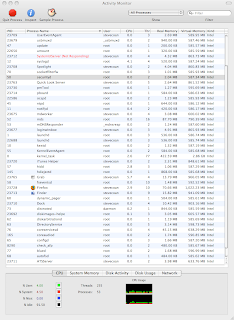
This could be the culprit. Unfortunately, I don't know what to do about it.
I tried. Time to reboot.
It took 05:16.3 to logout.
Login was quick.
I tried. Time to reboot.
However, I just pulled up Activity Monitor to see what programs are running. I do this on PC when it's acting up. I don't know Mac well enough to look for anything funny. However, I do see a program highlighted in red, a program that (from the name) would appear to be important and relevant to my current dilemma. System User Interface Server sounds important, and it's in red and not responding. Here's a picture of Activity Monitor that I got with the Grab utility (not the grab 3 key move):

This could be the culprit. Unfortunately, I don't know what to do about it.
I tried. Time to reboot.
logout again
I just logged out and back in again. It didn't take any time to login, but logging out took over 5 minutes. I timed it. The iPhone timer says 05:10.4. Does anyone think that sounds reasonable?
It still didn't clear up the finger swipe problem or the screen grab problem.
I think it's telling me, "Power down." But I want to give it another try first. I'll log out again.
It still didn't clear up the finger swipe problem or the screen grab problem.
I think it's telling me, "Power down." But I want to give it another try first. I'll log out again.
quirks
Some quirks today.
1. Last night Mac refused to play AVI videos. It told me "this is not a video file". I logged out and back in, and that cleared up. It took a long time to logout/in--so long in fact that I thought it had crashed. It stayed on the bluish screen with the cycle icon for a long time, and then that finally even stopped. But I decided to give it as long as it wanted. I left the room for a few minutes and came back to see it was on the login screen.
2. The multi-touch features of the trackpad just quit working. Actually, the one-finger swipe works because I can move the mouse, and the two-finger swipe works because I can scroll. But the three and four finger moves don't work.
3. I would take a screen shot of the system preferences for the finger swipe moves but that has quit working as well.
I think it's telling me "Logout again."
1. Last night Mac refused to play AVI videos. It told me "this is not a video file". I logged out and back in, and that cleared up. It took a long time to logout/in--so long in fact that I thought it had crashed. It stayed on the bluish screen with the cycle icon for a long time, and then that finally even stopped. But I decided to give it as long as it wanted. I left the room for a few minutes and came back to see it was on the login screen.
2. The multi-touch features of the trackpad just quit working. Actually, the one-finger swipe works because I can move the mouse, and the two-finger swipe works because I can scroll. But the three and four finger moves don't work.
3. I would take a screen shot of the system preferences for the finger swipe moves but that has quit working as well.
I think it's telling me "Logout again."
Monday, June 8, 2009
virtualizing

I virtualized my Thinkpad today. I basically skinnied it down and ran the VMWARE Convert utility on it. By skinnying down I mean that I deleted my "My Documents" folder and other folders with my files on them, since I am keeping those on the Mac now.
Here was the snag de jour.
When I brought up the VM on VMWare Fusion, it wanted me to activate windows. What the...?
It turns out that there was an issue with the Product Key because of the way Windows XP was installed on the Thinkpad. Here was the story in bullets:
- Ran vmware converter
- Booted the image in vmware fusion 2 on the mac
- Got the dreadful activation screen where Windows logs you out until you successfully re-activate (I've gotten this before when I've had to have my system board replaced)
- The activation wizard wanted me to type in the product key
- Typed in the product key on the genuine windows sticker on the bottom of the laptop
- Activation refused me
- Called Microsoft to activate over the phone (becuase they told me I would talk to a Microsoft specialist, which was a lie, it was a female computer)
- The Microsoft computer that sounded like a woman told me that I was SOL, and that I better call my vendor
- Called Lenovo to ask them what the deal was
- In the ensuing 15 minutes the friendly Lenovo support guy (no sarcasm--this guy was actually intelligent, reasonable, and helpful) and I determined that this was due to the way Windows XP was installed.
- (You have to purchase Vista on a new computer, but because Vista sucks so bad, Microsoft conceded with Lenovo and other PC vendors to offer a free downgrade to XP, which I did)
- So the product key for the operating system, the one on the bottom of the laptop, is for Vista, but the OS that is installed on the laptop is Windows XP*, which is somehow considered "legal" and "authorized" but not "valid".
- So I scrounged around my office, trying several product keys from my dozen or so copies of Windows XP that I've bought and am not using until I found one that worked.
- Maybe the police will show up and arrest me for software piracy tomorrow (gimme a beat--I'm hearing don't copy / don't copy that floppy / don't copy in my head)
bringing back vba / bigger<>better
I just found this article talking about the reasons Microsoft pulled VBA from Office 2008 for Mac:
http://www.betanews.com/article/Next-OfficeMac-will-bring-back-VBA-support/1210717012
The bottom line is that with all of Microsoft's resources and talent, they couldn't get it done. They couldn't get it done on time anyway. Apparently, they even knew they were screwing up when they shipped it, and had begun fixing it before they even shipped it:
And then I continue to see the largest of companies (not just Microsoft) (not by any means just Microsoft) (both product companies and services companies) produce crappy products that are either ill conceived or unfinished.
Bigger <> better.
http://www.betanews.com/article/Next-OfficeMac-will-bring-back-VBA-support/1210717012
The bottom line is that with all of Microsoft's resources and talent, they couldn't get it done. They couldn't get it done on time anyway. Apparently, they even knew they were screwing up when they shipped it, and had begun fixing it before they even shipped it:
"When we came to the realization in 2006 that there was no way for us to keep VB in the product and still ship Office 2008 on any semblance of the schedule we wanted, we announced its removal, but kept looking at how to bring it back into the suite even before we shipped," Schwiebert wrote this morning.On a somewhat personal note, I work for a "small" consulting company. We are not small in the sense of weak, but small in the sense of having the right amount of people to execute the types of projects we take on. But we continually find ourselves up against mudslingers who either explicitly state or infer that small means inadequate, unreliable, flighty, incompetent, and/or illegitimate.
And then I continue to see the largest of companies (not just Microsoft) (not by any means just Microsoft) (both product companies and services companies) produce crappy products that are either ill conceived or unfinished.
Bigger <> better.
why did microsoft cripple office 2008?
In a move I don't comprehend, Microsoft removed Visual Basic for Applications (VBA) from Office 2008 for Mac. This is really crazy because Microsoft is Visual BASIC. But they did. Here's the snippet from the Excel 2008 help file, on the page called "Best Practices":
Avoid using AppleScript scripts and Visual Basic macros
AppleScript scripts cannot run on the Windows operating system, and Visual Basic macros cannot run in Office 2008 for Mac. If you exchange documents with someone who is working in Windows, ask that person to avoid embedding Visual Basic macros in files. You can open a file that contains a Visual Basic macro, but you cannot run, view, or edit the macro. For more information, see My Visual Basic macros don't work.
So. Microsoft says that the best practice for using Excel is not to use any macros. Really? This is like the car salesman who tells you the best practice is not to use cruise control or to put the car in neutral and use the parking brake rather than using P.

And don't you love the advice? "Ask that person to avoid embedding Visual Basic macros in files." And you should probably say, "Please." And then you can explain to them how they don't need a macro anyway.
Maybe this is an extension of Microsoft's vision to move everyone from VBA to VB.NET scripting. Not sure, but by the lameness of their "best practices" advice it seems like abandonment not succession.
that uber versatile command key
That command key is something else on a Mac, isn't it? Every day I'm learning new places he likes to be in command. It's the one that looks like this: 
Yesterday I learned [ delete]. It's the move that allows you to delete without dragging to the trash. What a time saver. And wrist saver.
Today I learned that you can browse through folders and files in Finder with the help of our friend the key. To browse within a folder you use the arrow keys. To open a folder you press [ down] and to go back up to the parent folder you press [ up].
Of course everyone knows that the command key is for cut, copy, paste, and undo, just like on a PC.
I was very pleased when I first discovered this coincidence on Jill's Mac a few years ago. I'm not sure who invented the system first. But the letters work perfectly, making one hand operations of these these most common of shortcuts.
Also, I keep finding keyboard shortcuts pages online like this one. I usually get lost in there, though, because of the symbols they use for the keys. Here's a snippet explaining the shift keys:
Yesterday I learned [
delete]. It's the move that allows you to delete without dragging to the trash. What a time saver. And wrist saver.Today I learned that you can browse through folders and files in Finder with the help of our friend the
key. To browse within a folder you use the arrow keys. To open a folder you press [ down] and to go back up to the parent folder you press [ up].Of course everyone knows that the command key is for cut, copy, paste, and undo, just like on a PC.
| Operation | PC move | Mac move |
| Cut | Ctrl+X | X |
| Copy | Ctrl+C | C |
| Paste | Ctrl+V | V |
| Undo | Ctrl+C | Z |
I was very pleased when I first discovered this coincidence on Jill's Mac a few years ago. I'm not sure who invented the system first. But the letters work perfectly, making one hand operations of these these most common of shortcuts.
Also, I keep finding keyboard shortcuts pages online like this one. I usually get lost in there, though, because of the symbols they use for the keys. Here's a snippet explaining the shift keys:
I have several issues with apple keyboard shortcuts:)
(Control key)
(Option key) - "Alt" may also appear on this key
(Shift key)
(Caps Lock) - Toggles Caps Lock on or off
- They look like some kind of space age alien alphabet.
- My keyboard doesn't have any alien alphabet letters on it except
- What were they smoking when they decided that
- Even though the alien letters aren't on any of the keys (which they presumably used to be) they are still used copiously in references, even within the operating system. For example, this screenshot from Finder tells me that pressing
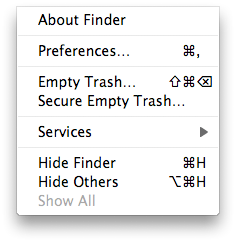
- I haven't developed the muscle memory for all these shortcuts yet, so until I do I will be slow on a Mac.

Sunday, June 7, 2009
baby steps
Took a few baby steps today (listed here in reverse order for some reason):
- Backed up bookmarks from Firefox (T61.Firefox.Bookmarks.Organize.Backup) and restored them on the mac (MBP.Firefox.Bookmarks.Organize.Restore)
- I turned off that annoying sound that mac makes by default when you change the volume--I was really glad to find that in System Preferences
- I burned my first CD today--I wanted to play some Jon Foreman songs in our church (from his Winter, Spring, Summer, and Fall EP's), so I made a burn folder, found the MP3 files in the iTunes library folder, dragged them over, and then burned it. It played very nicely on my Blu-Ray player
The most difficult thing for me continues to be the keyboard. I am SOOOOOOO good on the Windows environment with they keys. I can probably survive indefinitely without the mouse over there, and certainly don't resort to it unless I'm lazy. And I don't even really use Windows Explorer that much, so a comparison of it to Mac Finder is largely irrelevant. Over there I set up shortcuts to folders that I use regularly so I can press Window+R, type in the short name (like MYDOCS for the "My Documents" folder or MYPICS for "My Pictures" or DL for the folder where all my downloads go, etc.) Anyway, I'm missing that a lot. After a while using OSX (and either getting used to it or getting frustrated enough to modify the environment) I'll update my status for this particular topic.
The other thing about the keyboard is all the missing function keys. They're not so bad except for when I'm trying to use Excel, and then they're a BEAR. I'll have to spend some time on that conversion (of my brain from Excel for Windows to Excel for Mac).
Finally, I'm also compiling a list of Joys, Annoyances, and Oddities. It's a running list. I'll probably throw it up here soon and then repost it when it changes significantly.
ignition, contact
Back to the iPhone. When I was in sync hell I at least kept my sanity enough to forgo synchronizing contacts. So now I wanted to get that working. It worked swimmingly. Here's the story in bullet form.
- Plugged in the iPhone
- When iTunes launched, clicked on the iPhone sync page
- On the Info tab, chose to synchronize all contacts
- Hit Sync.
- After all contacts showed up in Address Book but not Entourage, googled "sync iphone contacts with entourage"
- Followed the directions on this article on apple.com to have Entourage sync with Address Book

There they are. In address book. In Entourage. Now I can email my friends without typing in their email addy.
Saturday, June 6, 2009
dvd musical chairs
Ok. I put a DVD in. DVD Player didn't start. Then I launched DVD Player and hit the play button. It said "supported disc not available". Then I hit the eject button and the disc didn't come out. Nice. Then I went to Finder but didn't Find the DVD. Nice. No DVD icon for it on the desktop either. Nice.
Before rebooting, I wanted to take a screen shot of iDVD to post here. Which I did by doing the double secret (command+shift+4+spacebar) move. This captures a screenshot of the active window and places it on the desktop. That turned out to be quite serendipitous. Here's why. When I tried to do the move for showing the desktop, I actually did the move for showing all windows. And it was at that point that I saw the splash screen for the particular movie running INSIDE VMWARE. Ok. So, my next move is to figure out how to detach it in there so I can run it out here.

Before I found that thing running inside there I was sure bitching. Clatyon told me I should just reboot and hold down the eject key while doing it. That would have been a defeat. Not today.
Fortunately this was VERY easy to resolve in VMWARE FUSION, surely one of the best applications ever invented. All I did was click on the icon of the disc in the lower right corner, and tell it to disconnect. Immediately after doing that I heard the disc start to spin, then DVD Player popped onto the dock, and the movie started playing.
vmware internet connection
I'm not sure why, but the internet connection within the vmware fusion virtual image died. I tried everythng I could think of. I disconnected and reconnected it within the app, I restarted the guest operating system (Windows 2003 Advanced Server). I'm sure I tried some other things, but I can't think of them right now.
I also brought over another virtual image that I know had a connection to the net on this mac as well as on the pc. It didn't work either. So it had to either be the mac or the vmware fusion app, not the image.
I just restarted the mac for the first time since I got it.
That fixed it.
So the cool thing is that I haven't had to restart the mac. The uncool thing is that restarting it clearly fixed the NAT issue vmware was encountering.
sprinting
 Now I'm down at the pool with the little kids. So this is a great time to test out my Sprint Aircard. I whipped it out, inserted it, clicked the menu to connect, and bing. I'm on the cellular internet posting from the pool. Does it get any better?
So, just to brag a bit on mac. I have installed this particular sprint card on at least 6 PC's--some that have PCMCIA only, some that take the express card. I've installed it on Vista and on Windows XP and I think even on Windows 2000. But I've never installed it by just inserting it and clicking connect. Every PC platform required me to install from CD and then download updated drivers once connected.
Maybe this is why Mac always said, "It just works."
vista's done
Vista is finished installing. I got MS Office 2007 Ultimate and Vista 2007 on there as well. And I ran Windows Update, which required 2 more reboots. But all in all that was rather uneventful.
Subscribe to:
Posts (Atom)
