Meanwhile, back at the ranch, the Lenovo Product Recovery discs are doing their song and dance to install Vista onto my old Thinkpad T61 that will go to Bala. It's pretty impressive those product recovery discs. Once you boot up and feed it the discs, it takes over and installs all kinds of stuff, reboots the PC multiple times, loads Vista and all the Lenovo ThinkVantage software, and customizes it for first use. I'm not sure why it doesn't detect and use the native resolution of the laptop (1680 x 1050) though. Maybe it likes stretching the thing fuzzy. But as long as it finishes I'm happy. And the best part is that it's all hands free. I haven't touched it.
As far as PC manufacturers go Thinkpad is the best engineered product IMO.
Saturday, June 6, 2009

strange annoying behavior
 Why does iPhoto open every time I plug in my iPhone?
This post was not helpful at all. Apple must have rewritten some of the programs since they posted this workaround?
This post was more what I was looking for, but still not helpful for the same reason. He refers to menu options that are simply not in the program. And it involves writing a program in AppleScript to override the standard behavior of the operating system. Isn't there a way to do this? There sure as heck are LOTS of people asking this question as evidenced by google's count of 680,000 hits for "iPhone launches iPhoto"
This post was very helpful, and it's the same advice I got from Clayton, my long time MacEvangelist friend who ironically just got saddled with a PC at his new job. The post tells you how to go into iPhoto and disable it from automatically launching when you connect a camera. And it worked. But I do want iPhoto to launch when I connect a camera. BUT NOT A PHONE! Hello? Yes, all phones have cameras. But if I want to grab the images off of my phone I, and most everybody else by google's count, would think to open iPhoto, click Import pictures, click from iPhone. Or something like that.
So for now I will have iPhoto NOT open for ANY camera. If that gets to be more annoying than opening when I plug in my iPhone then I'll switch it back and go for the other annoyance.
undersold
They really undersell these macs.
For example, I just noticed when I leaned the display back that it got brighter. I figured it was just an optical illusion having to do with the viewing angle. That can definitely happen. I know because my old laptops all had that condition. When I watched a movie in the dark I would always tilt it just right to get the best picture. But that's not it. I have gone back and forth and back and forth with this thing to figure out what's going on here.
Here's what it is.
The mac automatically senses ambient light and adjusts the screen accordingly. If there is more ambient light you need more light from the screen, and vice versa. So as I tilt the screen back toward the light at the top of the room it gets brighter. When I tilt it back down the backlight subdues. That's really smart. And that feature was nowhere in the marketing.
Just to make sure it was really doing this, I went into a dark place with no lights. My closet. Which is where I'm typing this. No matter how I tilt the screen here the backlight is the same.
Very smart.
And very undersold.
So I guess to all the guys out there saying macs are so expensive, I'm saying you're right. I'm also saying you get what you pay for. Whether or not what you pay for matches up with the marketing.
For example, I just noticed when I leaned the display back that it got brighter. I figured it was just an optical illusion having to do with the viewing angle. That can definitely happen. I know because my old laptops all had that condition. When I watched a movie in the dark I would always tilt it just right to get the best picture. But that's not it. I have gone back and forth and back and forth with this thing to figure out what's going on here.
Here's what it is.
The mac automatically senses ambient light and adjusts the screen accordingly. If there is more ambient light you need more light from the screen, and vice versa. So as I tilt the screen back toward the light at the top of the room it gets brighter. When I tilt it back down the backlight subdues. That's really smart. And that feature was nowhere in the marketing.
Just to make sure it was really doing this, I went into a dark place with no lights. My closet. Which is where I'm typing this. No matter how I tilt the screen here the backlight is the same.
Very smart.
And very undersold.
So I guess to all the guys out there saying macs are so expensive, I'm saying you're right. I'm also saying you get what you pay for. Whether or not what you pay for matches up with the marketing.
iPain relief
It turns out that most of the authorization trouble was with the iTunes store being down. Just after my previous post I went over to my PC to see if I could login to the iTunes store there. I couldn't. To eliminate the possibility that I had somehow screwed up my apple id or password, I asked Jill to login to the iTunes store on her Mac. She couldn't login either. Same red message. The one I posted with the red icon. So I went to bed.
This morning, I tried again to login to the iTunes store. It worked straightaway. So the iTunes store was down last night. I authorized this computer and am syncing again. And this time it's busy busy busy. So maybe everything will get sorted....
 And voilà! All of my apps are now showing up on my iPhone, and ring tones are working.
If anyone at apple in the iTunes development department is listening, you might want to consider how iTunes behaves here. Your users (probably new and old) expect that if there is an issue with authorization for some of their media (ringtones, music, apps...) that the rest of the sync will still continue, leaving the device and the iTunes library in a predictable state. I dare say no one likes to get into this random world where each sync returns different warnings that seem to be growing worse and worse on their way to imminent failure.
Also, and this is an observation from a long time computer user and software developer (me), that is not directed at apple or iTunes only, and it is this: give users immediate information they need to do the circus tricks you've devised for them instead of lazily sending them over to google.
What I mean is this. There is a menu option for backup in iTunes. There is a menu option for restore. But there is no menu option for "Move my entire setup to another computer" with a suboption for PC or Mac. It could still prompt me for a plethora of DVD's to do the transfer because of your rule that all library transfers have to be on CD/DVD. It would still require me to authorize the new computer and perhaps deauthorize the old computer because or your rule about 5 authorized computers. And I would still have to sync any devices on the new computer, erasing them and reloading them because of your rule of devices serving computers. And it could consider the ramifications of the iTunes store being down and offer the advice of "get something to drink and go to bed--maybe the store will be online tomorrow and you can finish up because there's nothing else you're gonna do about it except for the swearing". But in all this, if the user was empowered by a punch list and series of suggestions, with a place to check off things that were done, and with links to explanations and help and other resources right there, then your users wouldn't have to come to all these conclusions post mortem, complete with the newly acquired gray hairs.
(By the way, I am NOT a fan of wizards that MUST be completed IN ORDER or else the ENTIRE PROCESS fails, where you finally hit CANCEL and throw your computer out the window.)
And think about it, all you program managers out there. At some point you are thinking through this process. You better be. At some point somebody either in your development team or your beta testing group or your boss asks you the question, "so when a user gets a new computer and they want to transfer all their stuff over to it, how do they move their whole iTunes library and get everything working?" Because you and your team think in terms of functional requirements, you run through all of the tasks in your head and make sure they can all be done in some order to satisfy all the rules. You verbally respond, and then your boss or super-tester says, "Ok. That will work. Just wanted to make sure you thought of that." So you go on. And then when you create the help file you have someone type up that process on a one page article, maybe even throw in a few links to more info, giving basically what amounts to be the overview. Some people can probably read that and infer where and how to click and what not because they're familiar with the operating system, computers, your way of doing things, etc. But for most of us, we just get started, stressed out, and googled on our way to the third ring of the circus where all of our iTunes dreams come true.
And for the rest of you still reading, the moral of the story is:
This morning, I tried again to login to the iTunes store. It worked straightaway. So the iTunes store was down last night. I authorized this computer and am syncing again. And this time it's busy busy busy. So maybe everything will get sorted....
 And voilà! All of my apps are now showing up on my iPhone, and ring tones are working.
If anyone at apple in the iTunes development department is listening, you might want to consider how iTunes behaves here. Your users (probably new and old) expect that if there is an issue with authorization for some of their media (ringtones, music, apps...) that the rest of the sync will still continue, leaving the device and the iTunes library in a predictable state. I dare say no one likes to get into this random world where each sync returns different warnings that seem to be growing worse and worse on their way to imminent failure.
Also, and this is an observation from a long time computer user and software developer (me), that is not directed at apple or iTunes only, and it is this: give users immediate information they need to do the circus tricks you've devised for them instead of lazily sending them over to google.
What I mean is this. There is a menu option for backup in iTunes. There is a menu option for restore. But there is no menu option for "Move my entire setup to another computer" with a suboption for PC or Mac. It could still prompt me for a plethora of DVD's to do the transfer because of your rule that all library transfers have to be on CD/DVD. It would still require me to authorize the new computer and perhaps deauthorize the old computer because or your rule about 5 authorized computers. And I would still have to sync any devices on the new computer, erasing them and reloading them because of your rule of devices serving computers. And it could consider the ramifications of the iTunes store being down and offer the advice of "get something to drink and go to bed--maybe the store will be online tomorrow and you can finish up because there's nothing else you're gonna do about it except for the swearing". But in all this, if the user was empowered by a punch list and series of suggestions, with a place to check off things that were done, and with links to explanations and help and other resources right there, then your users wouldn't have to come to all these conclusions post mortem, complete with the newly acquired gray hairs.
(By the way, I am NOT a fan of wizards that MUST be completed IN ORDER or else the ENTIRE PROCESS fails, where you finally hit CANCEL and throw your computer out the window.)
And think about it, all you program managers out there. At some point you are thinking through this process. You better be. At some point somebody either in your development team or your beta testing group or your boss asks you the question, "so when a user gets a new computer and they want to transfer all their stuff over to it, how do they move their whole iTunes library and get everything working?" Because you and your team think in terms of functional requirements, you run through all of the tasks in your head and make sure they can all be done in some order to satisfy all the rules. You verbally respond, and then your boss or super-tester says, "Ok. That will work. Just wanted to make sure you thought of that." So you go on. And then when you create the help file you have someone type up that process on a one page article, maybe even throw in a few links to more info, giving basically what amounts to be the overview. Some people can probably read that and infer where and how to click and what not because they're familiar with the operating system, computers, your way of doing things, etc. But for most of us, we just get started, stressed out, and googled on our way to the third ring of the circus where all of our iTunes dreams come true.
And for the rest of you still reading, the moral of the story is:
Don't transfer your iTunes library and iPhone to a new computer when the iTunes store is down.
iPain 3

Now it's 98 problems. And it's problems with MUSIC! This is bullshit!!!!!!!
But wait. It tells me how to fix it. It says to go to the Store menu and "authorize this computer". Let's try that.
Bzzzzzzt. Oh. Thank you for playing. Here's your new message. You've graduated from yellow to red now:

iPain 2
And now all my music is gone. iTunes decided that if it warns me about unauthorized free applications (FREEEEEEE AAAPPPPLLLLIICCAAAAATIONS) that it needs to uncheck all my music, thereby erasing it.
Yes, I'm upset.
Yes, I'm upset.
iPain
Transferring iTunes from my PC to my Mac is a pain in the ass.
This is not my first time to transfer iTunes/iPhone. First off, this is my second iPhone. The first one was the original iPhone. The second one was the iPhone 3G. That upgrade was pretty flawless. Through iTunesPC I was able to convince apple that this was an upgrade, and so it transferred everything to the new iPhone. Then, I moved to a new PC. I literally copied the My Documents folder from the old PC to the new one, including My Music, which includes iTunes Music, and synced my iPhone 3G with iTunes on the new computer. Viola. I can't remember any problems with any of these other than minor issues I expected. But going from PC to Mac has been a royal pain.
First, not all of my music on my PC was in the iTunes Music folder (I thought it should have been, but I guess in some cases iTunes leaves legacy music in its original location when you switch to it from Media Player or RealPlayer or whatever). Because this can happen, one web site I found said that you should "consolidate" your library before transferring it from a PC to a Mac. This apparently forces iTunes to import all the music into its structure, making a standard library on the Mac. But iTunes told me there wasn't enough room on my hard drive to consolidate. I think I had 14GB free or so, and there were apparently 20GB or so of referenced media that lived outside the iTunes Music folder.
Second, because of issue number one, and because I wanted to do everything by the book, I decided to do an iTunes backup and restore. That actually seemed to work quite well. Time will tell. But I have the same complaint lots of iTunes users on the Net do: why can you only backup to CD/DVD? I'm glad that I now have 5 DVD's with my iTunes library backed up. Maybe I'll need those for something else again. But I wasn't glad to spend the 5 hours backing up and restoring.
So I gave iTunes a quick runthrough. I have lots of music and not a lot of videos or TV shows. I hae a few podcasts. All looked good.
And now for the moment of truth.
I plugged in my iPhone 3G. The first thing I noticed is that it didn't pick up the sync settings from the phone. That makes sense when you think about it because apple considers the computer to be the master and the phone/pod the slave. So I spent a few minutes checking boxes to sync music, video, podcasts, applications, contacts, etc. I was actually concerned that I wasn't getting the settings the same as on my PC, so I unplugged from the Mac, plugged back into the PC and reviewed. Then I had to start over. I was basically happy about the settings I made, so I hit Sync.
The first way iTunes scared me was with a message saying I had two choices: (1) Cancel, or (2) Erase this iPhone and replace it with contents from this computer's iTunes because each iPhone can only have one computer as its sugar daddy. I gulped and chose (2).
That seemed ok, except it got to the end and told me some of my content was not authorized on this computer. It was a copy of The Shack application, which is an eBook about a guy who supposedly spends a weekend with God in a Shack. It was a copy loaned to me by a friend. He typed in his password on my iTunes to "authorize" that computer. I need to get him over here I guess to authorize the mac. Problem is he lives in Atlanta. So I hit Cancel to ignore that. I can do without that.
But then it gave me another warning, a yellow one this time, about some of my applications not being authorized. Fine. I'm sure it's easily resolved. There were only two it complained about. I looked down at my phone to make sure everything looked ok except those two apps to my horror. All of my applications were GONE. Except the two apps it complained about. I thought maybe the sync died at those two apps and thus didn't finish, so I synced again. That's exactly what happened. The second pass it complained about 34 apps. The third pass it's up to 39.
 Anyway, they're gone. And remind my why they're not authorized on this computer? Isn't that the reason I backed up and restored the library instead of copying it over and mucking around with the XML-based configuration files like I read about in the mac gurus website?
My wife just called me. Her picture popped up like it was supposed to. But her ringtone was some stupid apple default. Gone. Maybe if I keep syncing and syncing it will finally get most of my stuff back on there, except the applications. What a buttache.
This is not my first time to transfer iTunes/iPhone. First off, this is my second iPhone. The first one was the original iPhone. The second one was the iPhone 3G. That upgrade was pretty flawless. Through iTunesPC I was able to convince apple that this was an upgrade, and so it transferred everything to the new iPhone. Then, I moved to a new PC. I literally copied the My Documents folder from the old PC to the new one, including My Music, which includes iTunes Music, and synced my iPhone 3G with iTunes on the new computer. Viola. I can't remember any problems with any of these other than minor issues I expected. But going from PC to Mac has been a royal pain.
First, not all of my music on my PC was in the iTunes Music folder (I thought it should have been, but I guess in some cases iTunes leaves legacy music in its original location when you switch to it from Media Player or RealPlayer or whatever). Because this can happen, one web site I found said that you should "consolidate" your library before transferring it from a PC to a Mac. This apparently forces iTunes to import all the music into its structure, making a standard library on the Mac. But iTunes told me there wasn't enough room on my hard drive to consolidate. I think I had 14GB free or so, and there were apparently 20GB or so of referenced media that lived outside the iTunes Music folder.
Second, because of issue number one, and because I wanted to do everything by the book, I decided to do an iTunes backup and restore. That actually seemed to work quite well. Time will tell. But I have the same complaint lots of iTunes users on the Net do: why can you only backup to CD/DVD? I'm glad that I now have 5 DVD's with my iTunes library backed up. Maybe I'll need those for something else again. But I wasn't glad to spend the 5 hours backing up and restoring.
So I gave iTunes a quick runthrough. I have lots of music and not a lot of videos or TV shows. I hae a few podcasts. All looked good.
And now for the moment of truth.
I plugged in my iPhone 3G. The first thing I noticed is that it didn't pick up the sync settings from the phone. That makes sense when you think about it because apple considers the computer to be the master and the phone/pod the slave. So I spent a few minutes checking boxes to sync music, video, podcasts, applications, contacts, etc. I was actually concerned that I wasn't getting the settings the same as on my PC, so I unplugged from the Mac, plugged back into the PC and reviewed. Then I had to start over. I was basically happy about the settings I made, so I hit Sync.
The first way iTunes scared me was with a message saying I had two choices: (1) Cancel, or (2) Erase this iPhone and replace it with contents from this computer's iTunes because each iPhone can only have one computer as its sugar daddy. I gulped and chose (2).
That seemed ok, except it got to the end and told me some of my content was not authorized on this computer. It was a copy of The Shack application, which is an eBook about a guy who supposedly spends a weekend with God in a Shack. It was a copy loaned to me by a friend. He typed in his password on my iTunes to "authorize" that computer. I need to get him over here I guess to authorize the mac. Problem is he lives in Atlanta. So I hit Cancel to ignore that. I can do without that.
But then it gave me another warning, a yellow one this time, about some of my applications not being authorized. Fine. I'm sure it's easily resolved. There were only two it complained about. I looked down at my phone to make sure everything looked ok except those two apps to my horror. All of my applications were GONE. Except the two apps it complained about. I thought maybe the sync died at those two apps and thus didn't finish, so I synced again. That's exactly what happened. The second pass it complained about 34 apps. The third pass it's up to 39.
 Anyway, they're gone. And remind my why they're not authorized on this computer? Isn't that the reason I backed up and restored the library instead of copying it over and mucking around with the XML-based configuration files like I read about in the mac gurus website?
My wife just called me. Her picture popped up like it was supposed to. But her ringtone was some stupid apple default. Gone. Maybe if I keep syncing and syncing it will finally get most of my stuff back on there, except the applications. What a buttache.
Friday, June 5, 2009
It turns out that Microsoft Outlook post office files (PST files) aren't supported by Microsoft Entourage. Brilliant, Microsoft. Thanks for all your support.
And even if you search for "can i move outlook pst files to entourage?" or anything similar to that, you don't even find a microsoft.com page among the search results.
Here was the most helpful (i.e. direct) info I got:
http://www.entourage.mvps.org/import_export/pst.html
But it turns out you can buy a program that you can install inside of Outlook to convert the subfolders one by one from Outlook to MBOX format, then you can copy them over to your Mac on a thumb drive, then you can install them in Entourage by drag-n-drop, and then you can re-organize them there.
That's great. I probably have 150 subfolders in my current Outlook PST. And then I have I think 6 archive PST's to convert, going back several years.
I'll let you know how that goes.
And even if you search for "can i move outlook pst files to entourage?" or anything similar to that, you don't even find a microsoft.com page among the search results.
Here was the most helpful (i.e. direct) info I got:
http://www.entourage.mvps.org/import_export/pst.html
But it turns out you can buy a program that you can install inside of Outlook to convert the subfolders one by one from Outlook to MBOX format, then you can copy them over to your Mac on a thumb drive, then you can install them in Entourage by drag-n-drop, and then you can re-organize them there.
That's great. I probably have 150 subfolders in my current Outlook PST. And then I have I think 6 archive PST's to convert, going back several years.
I'll let you know how that goes.
speed

I don't know how fast things are supposed to be on a mac, but they're damn fast on this one. Maybe it's the 8GB of RAM or the 2.93 GHz CPU or the 256GB Solid State Drive.
The first thing was how fast it booted. Christopher was running the camcorder for the whole thing so I can post the time on the original boot, but that's probably not the best indicator. The next time I reboot I'll time it or video it and put the results here.
Apps open virtually instantaneously from my perspective. I'm sure it's like anything else, though. Years later I'll be wondering why I should have to wait a few seconds at all. Maybe in the future whatever applications you have installed are always in memory all the time, even after you reboot. Who knows?
But the most critical test of all..........vmware fusion. I run a vmware image with Windows 2003 Advanced Server, SQL Server, Analysis Services, and a bunch of Web Applications and other services. This is my work. And
IT RUNS FASTER ON MY MAC THAN ON MY PC.
Once again, it could be that it's because I allocated 3GB of RAM to the guest operating system (hey, I've got 5 to spare) whereas on the PC I can only afford a maximum of 1.5GB since the PC only has 3GB total. Now, I could upgrade the PC to 8GB of RAM but then I would have to "upgrade" from Windows XP to Vista to be able to use it. Enough said.
It took VMWARE Fusion on the Mac just 43 seconds to boot up the guest OS. Once loaded, it was extremely snappy and responsive. The applications inside the guest OS loaded faster on the mac than on the PC. I almost cried when I saw Microsoft SQL Server running on a beautiful Mac. And I laughed out loud when I started opening objects in SQL Server Management Studio as instantaneously as Garage Band opened out in the Mac. I need to record the video for that and post it--maybe I can use Webex to do that.
tweetdeck
I had a little trouble getting tweetdeck installed. When I clicked on the app, an Adobe msg came up saying I needed to install the free Adobe AIR program. But it wouldn't let me click on it. So I went straight to the adobe website by searching adobe air. That took me two passes because the first link they showed me was for the AIR SDK, which is interesting, but I'm not just yet wanting to develop my own AIR app. But I got that installed now so I can start tweeting on the mac.
Thursday, June 4, 2009
rename home directory worked
The technique I mentioned in the last post worked, the one from the apple knowledge base where they walk you through creating a new account and moving all your settings, files, etc. from your old home. So one thumb down and one thumb up on this one. The second thumb was up.
Here's the link again:
first blush
This is my first post as a Mac. Yes, I'm writing from my MacBook Pro 17'' beauty.

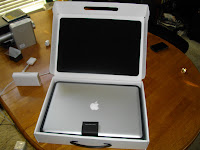


And my topic is about the first blush. I intend to journal my doings as I wade into macworld over the next days (weeks? months?).
the box
First off, I LOVE the box it came in. I've ordered many computers in my day, and many other electronics as well. The thing that hit me about this was that the box was made for the computer. Sure it was in an outer cardboard box like anything would be. But once inside, most computer vendors would do some engineering work to create packing material that precisely fit the computer, giving it a snug and comfortable ride. Not apple. What they did was custom design an entire box for the MBP's temporary home.


orientation
The next thing that happened was me feeling like an idiot. After I took the MBP out I felt like an idiot because I couldn't get the lid open. Then my son, who was manning the video camera suggested that I turn it around. Sure enough I had it backwards. It's because I was mesmerized by the apple I think, which was right-side up facing me. But it is supposed to be right-side up when it's open, facing the world. Free advertising.
((insert picture))
opening scene
The opening video was impressive I must say. Microsoft has over the years tried to make their opening video friendlier and more colorful. But it just can't compare to the opening scene of Star Trek, which is what the opening of my mac remind me of. Nice. And for the record, the Microsoft one still sucks.
keys
Then of course it was the keys. The last generation of macbookpro, which I saw all over New York City yesterday, had silver keys. They're beautiful, especially when they're backlit on a airplane. But they can't compare to the black backlit keys of this model. As I sit in my office right now, well lit enough with leaking sunlight through the shades, it is dark enough for the mac to light the keys. Or maybe it's always on. Dunno.

presentation
The next thing that happened was my wife's parents came to pick up my grandmother to take her back home. But before they left, they wanted to see the pictures of our trip to New York (my daughter and I just got back this afternoon--it was a special trip for her 15th birthday). So I ran my Canon A620 straight to the video port on the HDTV and did the slideshow thing. And then Jill asked me if there was a way to show them a youtube video on the HDTV. I told her that we would need a computer. Then she had a new idea--how about I hook my new apple up and use that? I think she planned it all along.
That proved simple enough. However, the thing went letterbox on me, and it went dual-home also (translated for non-displaylaureates: my desktop was split up onto two monitors--the laptop screen was the first one and the HDTV was the second one; I could drag windows back and forth to either; but the HDTV screen's picture didn't go all the way to the edge--the picture was in a "letterbox" in the middle of the screen with black bars on the sides). This was disconcerting to me, and it became irritating as I scoured the keyboard for the display toggle button.
On a Thinkpad it's fn+F7. On a Dell it's fn+F8. And on those models there is a little blue picture in the top corner of the function key letting you know that pressing it cycles the display mode from laptop to external monitor to both and then back to laptop. Not so on the mac. Instead I discovered that you get a little picture of the display up in the bar at the top of the screen (whatever that's called). When you click on that picture you get a dropdown menu. From there you can choose the screen resolution of all your active displays (laptop, HDTV, etc.) and choose a few other options. But one thing was disconcerting. I haven't yet figured out how to get a true mirror mode. My mac is 1920 x 1200. My HDTV is 1920 x 1080. When I went mirror mode it got all funkified on the laptop display. I'll probably figure this out, but I'm still not happy here. On my Thinkpads I have a COOL utility that ships with it called Presentation Manager. When you press fn+F7 like I mentioned before, instead of cycling though the display modes, you get an onscreen popup menu that you can choose which way you want to go. And you can save your settings so that with one click you can choose between mirror mode on an HDTV or an extended desktop on an external monitor that is an odd resolution, or several other settings. It also has a discovery mode to help you get the perfect settings on a brand new monitor the first time--such as when you show up to do a presentation at a client on their projector or supersize conference room monitor. Anyway, I'm sure I'll figure this out on a mac, but until then I still like the Lenovo Presentation Manager best of all.
But all things considered, it was very easy to hook up the MBP to the HDTV. I just plugged in the mini-to-VGA cable I bought with the mac, plugged that in to the VGA cable that remains connected to the back of the HDTV, and the MBP automatically found it and started sending video to it. No fanfare. It just worked.
appleusername451
Ok. This is a BIG warning to all new apple users. When you log in the first time to your new mac, you get a super fancy video that makes you feel like someone's in charge who knows what they're doing. It's the one I talked about before that looks like Star Trek. Careful. It asks you what language you want and where you are located, and how you're going to use the computer (to satisfy apple's snoopy side). And then it asks if you have an apple store id. Well, if you ordered your mac online you definitely have one because that's the only way you can order online. If you have an iTunes account, then you have one, too. This id spans the apple domain. Since I did had an apple store id, I proudly entered it and put my password in for it. That allowed apple to retrieve my personal information and fill in the rest of the blanks for me. All good so far.
Until.
I finished the login and setup process and opened Finder. I noticed something strange. On the prominent "places" location, basically the home page for the local computer, instead of having my name or an abbreviated version of my name, I get my apple store id. But I DO NOT WANT MY APPLE STORE ID AS THE NAME OF MY HOME FOLDER. My apple store ID was something I had to use for the apple store, which contained the ubiquitous number-in-the-login because someone had already used the id I wanted. I looked and looked for how to change this only to find that this is a huge issue. Everything is coded to that short name. Even though my "account" on this computer is called "Steve Coan" the short name, which is unchangeable AT ALL is my apple store id. This is terrible, apple.
I finally found this apple knowledge base article that shows you "How to change user short name or home directory name", which is actually a misnomer, because the truth is that you can't change this "short name" at all without jeopardizing the stability of your system. So what you do is:
- enable root login,
- login as root,
- navigate to the /users folder,
- rename the folder to the new short name you want,
- create a new user matching the new short name, and
- when the system objects because the folder already exists, tell it to recycle it
Well, that's about enough for the first blush. I am struggling through my acquaintance with the apple keyboard as I edit this post (control, option, command what?). Some of the key combinations I already know, like cut, copy, and paste. But some of this stuff drives me nuts like the fact that there is NO DELETE KEY. And that the backspace key is actually labeled "delete". Oy! Heh, I just realized that if you're a long time mac you may have no idea what I am talking about. :) But on the flip side I love the trackpad, which I am surprisingly comfortable with after a few trips to the apple store to experiment. More later.
Monday, June 1, 2009
the virtues of a doorbell
After all that waiting and tracking, I missed it. Fedex came this morning at 8:32 AM with my mac. Nobody heard them. They left a hanger on the door saying they would come back tomorrow. Oy! I need a doorbell. I think I'll get one that sounds like a foghorn.
But what a sprint! I put a custom order in on Wednesday night. Those Chinese went straight to work putting it together and then sent it to my doorstep on the opposite side of the globe via Fedex by Monday morning. Wow.
http://www.fedex.com/Tracking?action=track&language=english&cntry_code=us&initial=x&tracknumbers=401512624009
But what a sprint! I put a custom order in on Wednesday night. Those Chinese went straight to work putting it together and then sent it to my doorstep on the opposite side of the globe via Fedex by Monday morning. Wow.
http://www.fedex.com/Tracking?action=track&language=english&cntry_code=us&initial=x&tracknumbers=401512624009
still tracking
I'm so glad that they figured out how to post package tracking data on the web. Apple sent me an email linking to my fedex package tracking page.
I remember when we all first started talking about adding embedded objects on pages with web services, and we used UPS as a great example. The problem is that UPS and Fedex see embedding their information inside somebody else's page as taking traffic away from their page. So they won't open it up. Yeah, cause that's their business--driving web traffic to their site. Whatever.
But at least you can track it by linking to their site today with your tracking number. In the early days, they wouldn't even do that. You had to go to their page where they would give you an empty box, then you had copy and paste your forever long tracking number in there, and hit "submit".
How hard, really, would it be for them to make a web service that provided that same info as an html-rendered snippet that you could choose between several formats (all including the UPS or fedex logo as a graphic) and include in your own website? Not hard.
Well anyway, it's fun to see that the macbook pro that will adorn my desktop and coffee shops around the world was born in Shanghai, made it here by way of Anchorage, and hung out with some other macs in Memphis before heading my way.
Meanwhile, I'm heading to New York tomorrow with my daughter for a holiday. It's her birthday. Gonna catch Phantom of the Opera on Broadway, see the sights, and eat a hotdog off the street. Can't wait.
I remember when we all first started talking about adding embedded objects on pages with web services, and we used UPS as a great example. The problem is that UPS and Fedex see embedding their information inside somebody else's page as taking traffic away from their page. So they won't open it up. Yeah, cause that's their business--driving web traffic to their site. Whatever.
But at least you can track it by linking to their site today with your tracking number. In the early days, they wouldn't even do that. You had to go to their page where they would give you an empty box, then you had copy and paste your forever long tracking number in there, and hit "submit".
How hard, really, would it be for them to make a web service that provided that same info as an html-rendered snippet that you could choose between several formats (all including the UPS or fedex logo as a graphic) and include in your own website? Not hard.
Well anyway, it's fun to see that the macbook pro that will adorn my desktop and coffee shops around the world was born in Shanghai, made it here by way of Anchorage, and hung out with some other macs in Memphis before heading my way.
Meanwhile, I'm heading to New York tomorrow with my daughter for a holiday. It's her birthday. Gonna catch Phantom of the Opera on Broadway, see the sights, and eat a hotdog off the street. Can't wait.
Subscribe to:
Posts (Atom)
